How Is Pat Using Machine Learning At The End Of 2025?
I considered holding off until the start of 2026 to write this blog post, but there is a good chance that the LLM landscape will have evolved a lot by the time we get to March or April. The end of the year feels like a better anchor on the calendar, with the current pace of machine learning.

I don’t heavily use any machine-learning tools, and I am most definitely not a professional programmer. I might write something approaching 10,000 words every month. You’ll probably giggle at what I have been doing if you’re already a mile deep into integrating AI into your workflow.
I suspect that you’ll find something useful here if you haven’t begun using any AI tools, or if you’ve also only barely scratched the surface.
Tools like OpenCode and Claude Code aren’t just for programmers!
This seems like a good point to mention that I have started relying on OpenCode and my $6 per month Z.ai Coding Lite subscription. Yes. That is my referral link. I will get some small amount of credit if you subscribe, and I believe you will get 10% off your first payment.
I avoided Claude Code for a long time. I sit down to write code once or twice a month, so I didn’t think it was worth $17 a month for such occasional use. It really was a no-brainer to try out Z.ai’s subscription for $3 per month. I can easily get $3 of value out of OpenCode every month, and a year of subscription costs about the same as two months of Claude Code.
I already wrote an entire blog post about Z.ai’s Coding Lite plan, so I’m not going to say much more here. I am using it with OpenCode, but you can just as easily plumb that subscription into the Claude Code client.
I am so glad I subscribed, because that is how I learned that tools like OpenCode work great when writing blog posts with Markdown.
I can ask OpenCode to check my grammar. It will show me where I made mistakes, and I can ask OpenCode to apply all or just some of the changes for me. I can ask OpenCode to add links from older blog posts to the post I am working on, and it will do it in the same style that I normally would.
I can also ask OpenCode to write a conclusion section for the blog post I am currently editing. I’ve been having LLMs do this for me for a while now. I never use the whole thing, but it is nice to have a little jump start on the job, and the robot usually says something kind that I wouldn’t ever say about my own work. I enjoy being able to leave one of those nice bits in.
These are things I could always do with a chat interface, but OpenCode edits my file in place. I don’t have to paste the blog post into another window. I don’t have to select text and ask Emacs to send it to a service. OpenCode finds the relevant files, sends the appropriate text up to GLM-4.6, and it makes the necessary changes on its own.
It saves me some time. It saves me some effort. Best of all, it is finally doing some of the more monotonous work for me. I don’t want the machines writing blog posts for me.
- Is The $6 Z.ai Coding Plan a No-Brainer?
- Contemplating Local LLMs vs. OpenRouter and Trying Out Z.ai With GLM-4.6 and OpenCode
I don’t write code often, but I do write code sometimes!
I have been using OpenRouter’s chat playground for most of the last year. Talking about chat interfaces is going to be in the next section, but I feel like this is a good point to mention my spending. I put $10 into my OpenRouter account 11 months ago, and it took that entire 11 months to whittle away nearly 50 cents of those credits using the chat interface.
One day of light coding with OpenCode ate up an entire dollar. Not a lot of money, but more money spent in a single day that I had spent in the previous 11 months. I don’t think my coding load would ever add up to a significant fraction of a Claude Code subscription, but one dollar was a big enough percentage of a Z.ai Coding Plan subscription to make me set up a quarterly subscription.
OpenCode is meant for writing code. It does a great job at that, even if I am a light user and don’t ask it for much. The only proper story that I have is a repeat from my post over at patshead.com. I asked OpenCode to make the sequential build script for my OpenSCAD gaming mouse project into a more parallel build process.
This cut my build time for all the mice down from around 5 minutes to just 45 seconds, but the process took quite a few steps. Some of those steps were my fault, because I kept asking for more just because I could. Some of those extra steps were due to the LLM goobering things up.
I got to a point where things were almost working, but the STL files weren’t actually being built. OpenCode figured out how to run my build script, it figured out where new STL and 3MF files were supposed to be showing up, and it iterated quite a few times before figuring out that it accidentally added an extra layer of quotes in the OpenSCAD commands.
I had to nudge OpenCode along a few times, because it didn’t know my build script only builds 3D-printable files for source code files that have changed since their output files were last built. I should probably be including this sort of information in an agents.md file.
This is where tools that run themselves really start to cost money. If I remember what was on the billing dashboard correctly, I burned through something around a million free input tokens that day. That would have been enough tokens at OpenRouter to cost me as much as my Z.ai subscription.
I’m ready for local LLMs, but I don’t have a good use case yet
I have been experimenting. I can run a simple speech-to-text model, a simple text-to-speech model, and a small 2B LLM on the N100 mini PC server in my homelab. That little machine has enough horsepower to respond to a voice query like, “How is the weather today?” about as fast as my Google Home Mini, but I didn’t attempt to plumb that into the Internet so it could answer correctly. That was enough to tell me that it won’t require expensive hardware to get a useful voice interface going for Home Assistant.
I have been messing around with what sort of models might fit on my 16 GB Radeon 9070 XT. I learned that I can squeeze Gemma 3 4B at Q6 along with its vision component and 4,000 tokens of context into 6 GB of VRAM. That means I could run this on a used $75 8 GB Radeon RX580 GPU in my homelab and send it photos of my front porch and ask, “Is there a package on the porch?” That could also be the model that Home Assistant’s voice interface could rely on. There might even be enough VRAM left over to fit both a text-to-speech and a speech-to-text model!
📦[pat@almalinux-rocm llama.cpp]$ ./build/bin/llama-bench -m ./models/Ministral-3-14B-Instruct-2512-UD-Q4_K_XL.gguf -d 16000 --flash-attn 1
ggml_cuda_init: GGML_CUDA_FORCE_MMQ:    no
ggml_cuda_init: GGML_CUDA_FORCE_CUBLAS: no
ggml_cuda_init: found 1 ROCm devices:
  Device 0: AMD Radeon Graphics, gfx1201 (0x1201), VMM: no, Wave Size: 32
| model                          |       size |     params | backend    | ngl | fa |            test |                  t/s |
| ------------------------------ | ---------: | ---------: | ---------- | --: | -: | --------------: | -------------------: |
| mistral3 14B Q4_K - Medium     |   7.78 GiB |    13.51 B | ROCm       |  99 |  1 |  pp512 @ d16000 |       606.28 ± 94.39 |
| mistral3 14B Q4_K - Medium     |   7.78 GiB |    13.51 B | ROCm       |  99 |  1 |  tg128 @ d16000 |         43.34 ± 0.03 |

build: 61bde8e21 (7240)
📦[pat@almalinux-rocm llama.cpp]$
16K is more context than I would need for blogging, and Mistral 3 processes prompts three times as fast with a 4K context window, but I was hoping to see how it might manage being called from OpenCode!
I have used older local models for help writing blog posts, and they have been more than up to the task for a long time. I can run a model like Gemma 3 12B on my GPU, and it would be almost as capable for this task as any paid model from 18 months ago.
I have been hoping I could squeeze a smart enough model to use with OpenCode onto my GPU, but you really need a minimum of 16,000 tokens of context, and I regularly push up queries that are into the 30,000 token range. The smallest and barely usable agentic coding models CAN be squeezed onto my 16 GB GPU, but they won’t leave enough room for context.
I learned from my testing with OpenRouter that I wouldn’t want to try coding with anything less than Qwen Coder 30B A3B. That requires a minimum of a GPU with 32 GB of VRAM, or a $2,100 Ryzen AI Max 395 mini-PC. The former would be fast but tight, the latter would be slower, roomier, and more expensive.
But the fact is that even if I could run Qwen 30B A3B locally, I’d still prefer to use GLM-4.6 in the cloud. Running GLM-4.6 through my Z.ai subscription is faster, costs pocket change, and the model is 15 times bigger. It would still be cheaper than buying a beefy GPU for me to pay by the token for even faster responses from GLM-4.6 hosted by Cerebras.
Having a chat interface available is useful
I used OpenRouter’s chat playground for the majority of the last year. They let you configure little assistants that point to different models, and OpenRouter has a vast array of models to choose from at all sorts of different price points.
The trouble I had with OpenRouter’s web interface revolved around organization. My saved chats would sort of go missing, or they would get gummed up by future chats. I just wanted to have configured places to start a fresh chat about coding or about blogging that started from a known place, but my interface kept getting filled up with useless history. It just isn’t made to be organized.
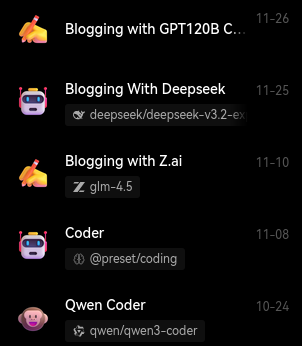
I wound up installing LobeChat locally and pointing it at OpenRouter’s API. LobeChat let me set up coding and blogging assistants with their own system prompts. The coding chat uses Qwen Coder 480B with a coding-friendly system prompt, and my blogging chats use GPT-OSS-120B or DeepSeek V3.2. Mostly the latter, but I was curious how well GPT-OSS would do, because that is a model I could conceivably run on a Ryzen AI Max+ 395 mini PC.
LobeChat doesn’t lose my assistants. It keeps separate collections of chat history under each agent, so all my blogging jibber jabber stays in one place. It has been a nice upgrade.
I definitely find myself using OpenCode way more often than a chat interface, but I am glad I have chat available. Sometimes you have a simple problem, and you don’t want to wait for OpenCode to collect context from multiple files, send 25,000 tokens up to the LLM, and then possibly wait for two or three round trips to the LLM in the background.
Sometimes you just need a simple function to do a simple thing, and the chat interface will give it to you in three seconds.
I am also using AI image and video generation in the cloud
I was generating images locally on my 12 GB Radeon 6700 XT in the earlier days of Stable Diffusion. I would make goofy but relevant pictures to break up long stretches of words in blog posts. I’d just have Stable Diffusion run through a matrix of LORAs, and it would generate around 600 pictures in the ten minutes it would take for me to make a latte in the kitchen. Then I’d grab one or two of the best to use in a blog.
I have been using Runware.ai’s playground to generate images even since Flux came out. Flux was too big and too slow to run well on my GPU, but it also does a much better job of adhering to the prompt, so I don’t need to generate hundreds of pictures anymore. Runware gives me a good photo in a few seconds, and I can even pass any images I like back through Flux Kontext to make minor tweaks or even add my own face to the images.
I only use Runware’s video generators for fun. I usually put myself into a pizza situation to announce Butter, What?! pizza night. I don’t have much use for short videos in my blogs!
Runware’s pricing is great. Images usually cost me a fraction of a penny, and short videos cost somewhere between a few pennies and a few nickels.
Conclusion
I hope that what I have written here backs up my early statement that I am a fairly light user of machine learning. At the same time, I hope that this demonstrates that there are useful things you could be doing while only scratching the surface.
The tools I’ve mentioned here have saved me time and effort, even with my modest usage patterns. Even better, some of the tasks they are handling for me are boring and mundane, so they are exactly the sort of jobs I don’t want to have to do myself!
What AI tools are you using in your workflow? Are you also a light user who’s found some clever ways to integrate machine learning into your daily tasks? Come share your experiences and ask questions over in our Discord community. We would love to hear what you’re working on!